

Exports and SBOM
Sooner or later someone outside engineering asks for the list. A customer wants a software bill of materials before signing, an auditor wants evidence that dependencies are monitored, or an incident review wants to know exactly what was in a release. The Export Data page produces those artefacts from the same inventory the console shows.
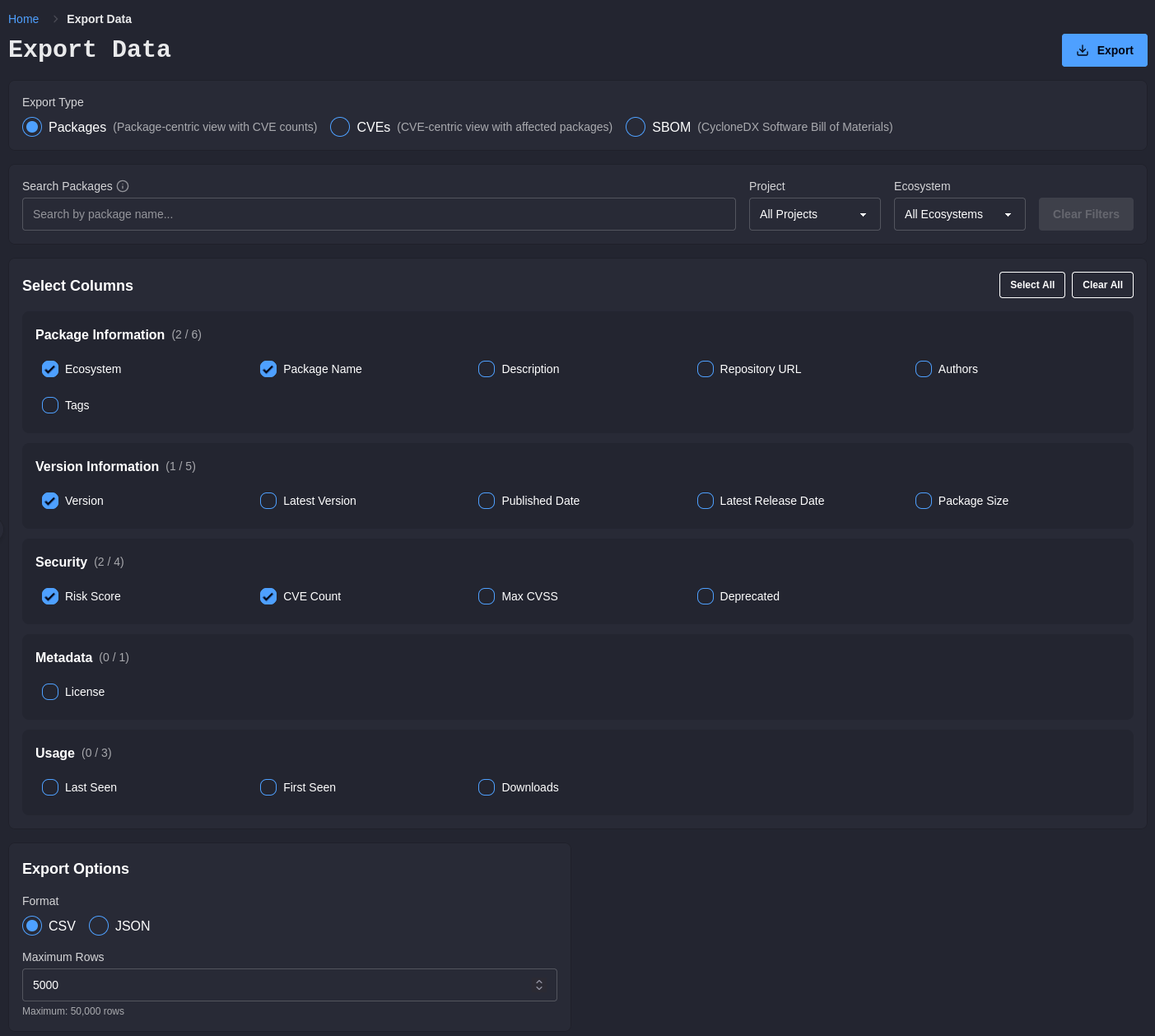
Export Types
Section titled “Export Types”| Type | Shape | Use it for |
|---|---|---|
| Packages | One row per package version, with advisory counts | Inventory reporting, dependency reviews, feeding a GRC system |
| CVEs | One row per advisory, with the packages it affects | Vulnerability reporting and remediation tracking |
| SBOM | A software bill of materials in CycloneDX or SPDX | Customer and regulatory SBOM requests, release records |
| Decisions | One row per allowed or blocked package request in a period | Audit requests for the list of decisions made |
Packages and CVEs are two views of the same facts. Choose by the question being asked: a dependency review wants a package-centric list, while a vulnerability report wants an advisory-centric one.
Packages and CVEs Exports
Section titled “Packages and CVEs Exports”Narrow the export with the same search, project, and ecosystem filters used elsewhere in the console, then choose the columns to include. Exports are produced as CSV or JSON.
CSV is the right answer when a person will open the file, and it is what most spreadsheet-based compliance processes expect. JSON is the right answer when a system will read it.
Pick the columns deliberately. An export with every column is harder to review than one carrying only what the recipient asked for, and a compliance reviewer working through fifty columns is a reviewer likely to miss the two that mattered.
The Packages page also has its own Export control that takes the current view and filters straight out, which is quicker when you already have the table filtered the way you want it.
SBOM Export
Section titled “SBOM Export”SBOMs are generated in CycloneDX or SPDX format. CycloneDX is the default, and receives declared licenses plus known advisory information. SPDX output is an SPDX 2.3 document describing the application and its dependencies with purl external references, and — because SPDX 2.3 has no native vulnerability model — it never carries vulnerability data.
Choose a single project for one SBOM file, or All Projects to generate a ZIP archive containing one SBOM per project. Per-project files are usually what you want, since an SBOM is a statement about a specific deliverable rather than about your whole estate.
Include Vulnerabilities adds known advisory information to the SBOM. It applies to CycloneDX output only, and whether to include it depends on the recipient:
- Include it for internal release records and incident reviews, where the vulnerability position at a point in time is exactly the useful part.
- Consider excluding it for an SBOM being sent outside the organisation, where an inventory is being requested rather than a security assessment, and where a snapshot of open findings can be stale and misleading by the time it is read.
An SBOM is a point-in-time statement. Generate it as part of the release process rather than reconstructing one months later, and keep it alongside whatever else you retain about that release.
Decisions Export
Section titled “Decisions Export”The Decisions export answers the request that usually opens an audit: a list of the decisions made over a period. It produces a CSV with one row for every package request the proxy blocked, and every one it allowed and then served or redirected to, between the two dates you choose. An allowed request that ended without delivering the package, for example because that version does not exist upstream, is not recorded.
| Column | What it holds |
|---|---|
| Timestamp (UTC) | When the request was decided |
| Decision | allowed or blocked |
| Rule | The policy rule that decided it, such as denylist_match, license_denied, or cvss_threshold |
| Rule Pattern, Rule Version Range, Rule Reason | The allow or deny rule as it stood when the decision was made. Blank when the request was decided by policy rather than by a rule |
| Rule Author | Who wrote that rule. Held against the rule itself, so it stays the original author however many times the rule has since been changed |
| Rule Authored At (UTC) | When the rule was first written, likewise carried forward across changes |
| Decision Reason | The reason recorded with the decision |
| Ecosystem, Package, Version | What was requested |
| Project | The project the API key is bound to |
| Correlation ID | The identifier shared by requests from one build |
| Event ID | The identifier of the same event on the Logs page |
| Matched Rule ID | The allow or deny rule that decided the request, when one did. Rules are kept after removal, so the identifier stays resolvable |
Every decision in the period is included, with no row limit, so a long period on a busy workspace produces a large file. The period includes its start and excludes its end. Decisions recorded before rules were stored have an empty rule. Client context is not part of the export.
A rule is changed by superseding it rather than by editing it, so the row a decision points at keeps saying what it said at the time. That is why the author and authored-at columns show the rule’s original author even for a decision that a later version of the rule decided.
How far back the export can reach is set by how long your deployment retains events. See Request Logs.
Policy Changes Export
Section titled “Policy Changes Export”Administrators can export every change to security policy in a period: settings, allow and deny rules, and vulnerability exceptions. Choose Policy changes as the export type, set the period, and export. The result is a CSV with one row per changed setting or rule:
| Column | What it holds |
|---|---|
| Timestamp (UTC) | When the change was made |
| Changed By | Who made it |
| What | setting, allow rule, deny rule, or exception |
| Change | updated for a setting; added, updated, removed, revoked, or reactivated for a rule |
| Setting | The setting’s name, for a setting change |
| Ecosystem, Pattern, Version Range | The rule, for a rule change. Pattern matches Rule Pattern in the decisions export |
| Advisory | The advisory an exception accepts |
| Before, After | A setting’s value before and after the change. For a rule, its expiry and whether it was revoked, and its reason when the change altered it |
| Reason | The rule’s reason |
| Rule ID | The rule after the change, or the removed rule. The same identifier as Matched Rule ID in the decisions export |
| Changed By User ID, Audit Event ID | The identifiers behind the person and the Audit Log entry |
Rules changed together, through an import or a bulk removal, each get a full row of their own. Every change in the period is included, with no row limit. The period includes its start and excludes its end. Older changes, recorded without their values, appear once each with their description in Change.
Together with the decisions export, this answers what was decided, and what the policy was and who changed it, for the same period.
Practical Notes
Section titled “Practical Notes”- Exports respect the workspace you are in. An export from a development workspace describes development, not production.
- Coverage of an export is coverage of the inventory behind it. Dependencies installed through a path that bypasses the proxy do not appear unless the package scanner reports them. See Package Scanner for closing that gap in environments that cannot route through the proxy.
- Exported files carry the same data your workspace holds, including package names and versions that may be internally sensitive. Handle them accordingly before sending them outside the organisation.
- A cell in a CSV export whose value begins with
=,+,-, a tab or a carriage return is written with an apostrophe in front of it, so a spreadsheet reads it as text instead of evaluating it when the file is opened. Part of what lands in a cell comes from outside your organisation, and package names and rule reasons are worth reading as text. Nothing is removed: the apostrophe is a marker in front of the value, and the text behind it is what was recorded. A bare number such as-1is left alone, and a scoped npm package such as@scope/nameis left alone.